Map tests
A random map looks different on every seed. A map can be fine on the ten seeds you tried and still leave a player without gold on the eleventh.
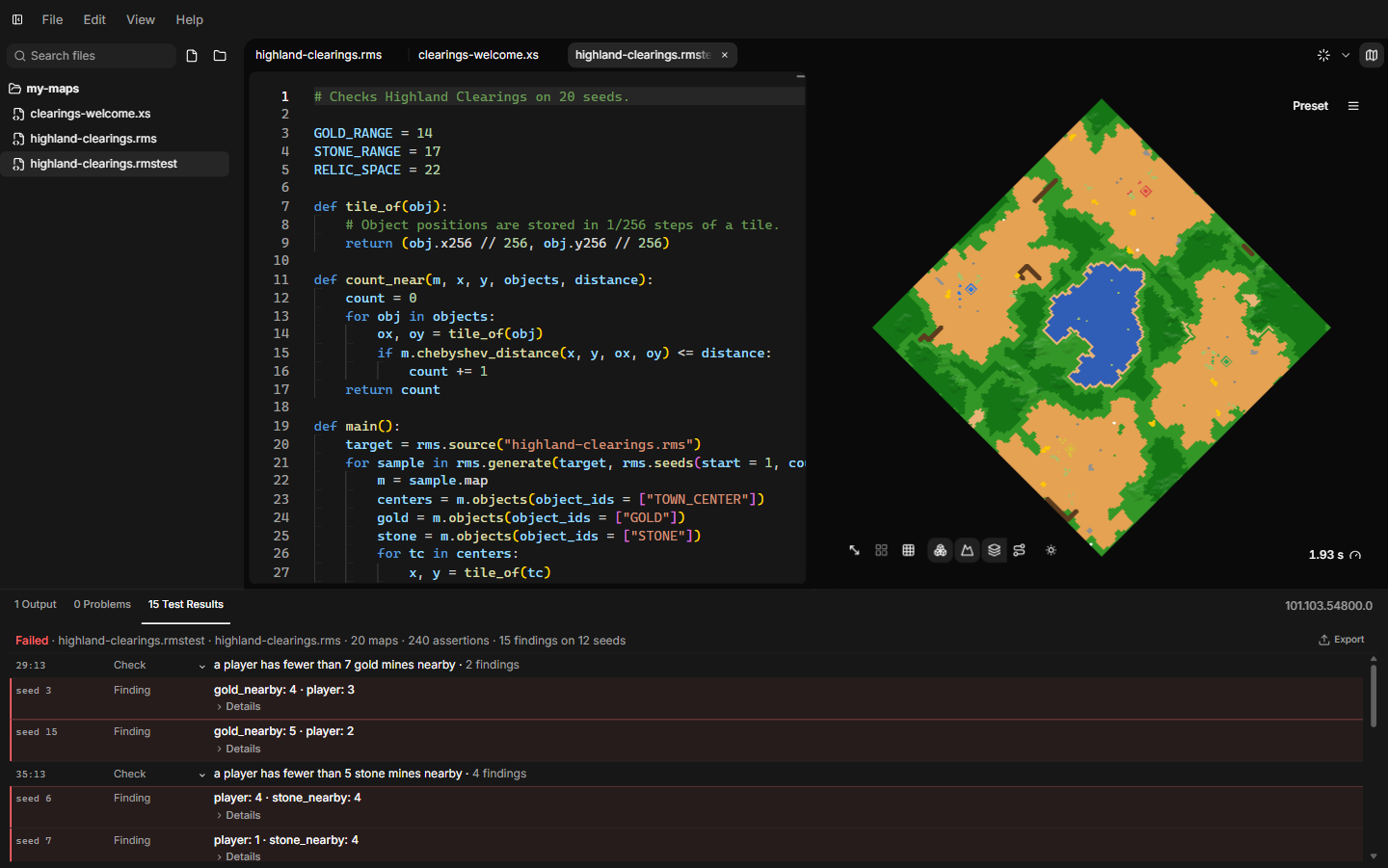
A map test checks this for you. It generates your map for many seeds, one after another, and runs your checks on every result. At the end you get a list of the seeds where something was wrong. Click one and the preview shows that same map.
Map tests run entirely inside AoE2RMSIDE. The game is not needed.
You do not need to be a programmer to write one. Map tests are small scripts in a simple language, and most tests follow the same pattern. This page shows that pattern step by step.
Your first map test
Create the file
Map tests are files with the extension .rmstest. To create one:
- right-click a folder in the Explorer and choose Map-Test Script, or
- use the + button next to a folder and choose Map-Test Script, or
- choose File → New Map-Test Script.
The new file contains a commented example. Lines starting with # are
comments, so the example does nothing until you remove the # signs.
Write the test
Replace the content with this test. It generates your map for ten seeds and checks that each map has at least eight gold mines:
def main():
    target = rms.source()
    seeds = rms.seeds(start = 1, count = 10)

    for sample in rms.generate(target, seeds):
        gold = sample.map.objects(object_ids = ["GOLD"])
        sample.expect(
            len(gold) >= 8,
            message = "expected at least 8 gold mines",
            values = {"gold": len(gold)},
        )

main()
Line by line:
def main():starts a block of code namedmain. Everything that belongs to it is indented by four spaces.rms.source()picks the map to test. Without a file name it uses the pinned map (see below).rms.seeds(start = 1, count = 10)makes the seeds 1, 2, 3 … 10.rms.generate(...)generates one map per seed. Theforline then goes through the results one by one. Each result is called a sample.sample.map.objects(object_ids = ["GOLD"])returns every gold mine on that map.GOLDis the same name your RMS script uses.sample.expect(...)is the check. If the condition is false, it records a finding for this seed with your message and values.main()on the last line runs everything.
Pin the map and run
- Open the map you want to test and make its tab active.
- In the Run options (the arrow next to the Run button), press Pin executed script.
- Switch to your
.rmstesttab and press Run (or F5).
The preview updates as maps are generated. While the test runs, a progress
bar on the right side of the bottom panel bar shows Testing. Point at it
to see how many maps are done, for example "Testing maps, 30% (12 of 40
maps)". The total counts the maps the test has asked for so far, so it grows
when a later rms.generate asks for more. When the test ends, Output shows
the test as one line with its result (Passed or Failed), and a
Test Results tab opens in the bottom panel (see
Read the results).
The language in two minutes
Map tests use Starlark, a small language that looks like Python. If you know some Python, you already know most of it. If not, these rules cover nearly everything on this page:
- Indentation matters. Lines inside
def,forandifare indented by four spaces. #starts a comment.- Put your loops and
ifstatements inside a function such asmain, and callmain()at the end. Starlark does not allow them at the top level of the file. - Top-level constants are fine, for example
LIMIT = 20. - Lists are written
["GOLD", "STONE"]. Text is written in quotes,"like this". - Compare values with
==(equal),!=(not equal),<,<=,>and>=. Combine conditions withand,orandnot. A comparison givesTrueorFalse. len(x)counts the items in a list.min,max,range,sortedandabswork as in Python.
A few Python features are not available: import, f-strings and sum().
Use print("gold:", count) or "gold: {}".format(count) to build text.
The editor helps with map tests too: suggestions and documentation for the
rms functions, Go to Definition (F12) for your own functions and
names, Go to Symbol and Format Document. The right-click menu lists
only what works in map tests.
Map tests cannot read or write files, use the network or pick random numbers. All variation comes from the seeds, so a test gives the same result every time you run it.
Names of terrains and objects
Wherever a map test asks for terrains, objects or cliff types, you can use
the same names as in your RMS script: "GOLD", "FORAGE", "TOWN_CENTER",
"DEEP_WATER", "CT_DESERT" and so on. Write them in quotes, exactly as in
RMS. The names come from the game version selected for the preview.
Numbers work too, and you can mix both: ["GOLD", 102]. A name AoE2RMSIDE
does not know stops the test with a message that names it.
The results a map test gets back, such as tile.terrain or
obj.object_id, are numbers. To compare them with a name, use rms.id:
def main():
    for sample in rms.generate(rms.source(), rms.seeds(start = 1, count = 20)):
        corner = sample.map.tile(0, 0)
        sample.expect(
            corner.terrain != rms.id("DEEP_WATER"),
            message = "the corner of the map is deep water",
        )

main()
Choose the map
rms.source() without a file name uses the pinned map. If nothing is pinned,
the test stops and asks you to pin a map or name one.
You can also name the map. The path is relative to the open folder (or, for a test opened on its own from outside the open folder, to the test's own folder):
def main():
    target = rms.source("maps/arena.rms")
    seeds = rms.seeds(start = 1000, count = 200)
    samples = rms.generate(target, seeds, preview = False)
    print("generated", len(samples), "maps")

main()
The map size, players, game mode and game version come from the preview's current settings, the same ones an ordinary Run uses. See Preview.
Run many seeds
rms.seeds makes a list of seeds:
| Call | Seeds |
|---|---|
rms.seeds(start = 1) |
1 |
rms.seeds(start = 1, count = 100) |
1, 2, 3 … 100 |
rms.seeds(start = 1000, count = 50, step = 7) |
1000, 1007, 1014 … |
You can also write a list of seeds yourself, for example [5, 17, 42].
rms.generate(target, seeds) shows each finished map in the preview. With
preview = False the preview stays as it is, which is useful for long runs.
AoE2RMSIDE generates several maps at the same time. By default (Automatic) it decides how many from your computer's processor cores, free memory and the map size, and leaves room for the editor. To use a fixed number instead, open the Run options (the arrow next to the Run button) while the map test is the active file, and enter it under Test cores (it takes the place of Live test on run). Leave it empty for Automatic, or enter a number from 1 to your computer's processor count (at most 32); Use Automatic empties the field again. Point at Test cores to see the range for your computer. Work that is the same for every seed is done once per batch, not once per map. Whatever the number, the results always come back in seed order and are the same.
Check something about each map
There are two ways to record a problem:
sample.expect(condition, message = "...")records a finding only when the condition is false.sample.report(message = "...")always records a finding. Use it inside your ownif.
Both take two optional extras:
values = {...}: numbers or short texts to show with the finding, for example{"gold": 5}.code = "...": a short label you choose, for example"no-gold", to group findings of the same kind.
The following examples show common checks.
Count objects
objects returns the objects with the names you give. owner limits the
result to one player; 0 is Gaia (nature).
def main():
    for sample in rms.generate(rms.source(), rms.seeds(start = 1, count = 50)):
        m = sample.map
        centers = m.objects(object_ids = ["TOWN_CENTER"])
        sample.expect(len(centers) == 2, message = "expected two Town Centers")

        resources = m.objects(object_ids = ["GOLD", "STONE"])
        print("seed", sample.seed, "has", len(resources), "gold and stone objects")

main()
Count terrain
count_tiles counts the tiles with any of the given terrains. This test
reports maps where more than 40% of the map is water:
WATER_TERRAINS = ["WATER", "DEEP_WATER", "MED_WATER"]

def main():
    for sample in rms.generate(rms.source(), rms.seeds(start = 1, count = 50)):
        m = sample.map
        water = m.count_tiles(terrain_ids = WATER_TERRAINS)
        percent = water * 100 // (m.width * m.height)
        sample.expect(
            percent <= 40,
            message = "more than 40% of the map is water",
            values = {"water_percent": percent},
        )

main()
// divides and drops the remainder, so percent is a whole number.
Measure distances
Objects store their position in 1/256 of a tile. Divide by 256 to get the tile. This test checks that every Town Center has gold within 20 tiles:
def tile_of(obj):
    # Object positions are stored in 1/256 steps of a tile.
    return (obj.x256 // 256, obj.y256 // 256)

def main():
    for sample in rms.generate(rms.source(), rms.seeds(start = 1, count = 50)):
        m = sample.map
        gold = m.objects(object_ids = ["GOLD"])
        for tc in m.objects(object_ids = ["TOWN_CENTER"]):
            tx, ty = tile_of(tc)
            nearest = None
            for mine in gold:
                gx, gy = tile_of(mine)
                d = m.chebyshev_distance(tx, ty, gx, gy)
                if nearest == None or d < nearest:
                    nearest = d
            sample.expect(
                nearest != None and nearest <= 20,
                message = "a player has no gold within 20 tiles",
                values = {"player": tc.owner, "nearest": nearest},
            )

main()
chebyshev_distance counts tiles like a king moves in chess: diagonal steps
count as one. manhattan_distance counts only straight steps, and
squared_distance gives the straight-line distance squared.
Check that players are connected
connected tells you whether you can walk from one tile to another using
only the terrains you list. This test checks that every player can reach the
first player over land:
WALKABLE = ["GRASS", "BEACH", "SHALLOW", "DIRT"]

def main():
    for sample in rms.generate(rms.source(), rms.seeds(start = 1, count = 50)):
        m = sample.map
        centers = m.objects(object_ids = ["TOWN_CENTER"])
        for other in centers[1:]:
            first = centers[0]
            linked = m.connected(
                first.x256 // 256, first.y256 // 256,
                other.x256 // 256, other.y256 // 256,
                terrain_ids = WALKABLE,
            )
            sample.expect(
                linked,
                message = "two players are not connected by land",
                values = {"player_a": first.owner, "player_b": other.owner},
            )

main()
List every walkable terrain your map uses. connected only looks at terrain.
It moves in straight steps (up, down, left, right) and ignores objects.
Find separate areas
components splits the tiles with the given terrains into separate connected
areas, for example lakes or islands. Each area is a list of tiles:
WATER_TERRAINS = ["WATER", "DEEP_WATER", "MED_WATER"]

def main():
    for sample in rms.generate(rms.source(), rms.seeds(start = 7)):
        m = sample.map
        lakes = m.components(terrain_ids = WATER_TERRAINS)
        print("seed", sample.seed, "has", len(lakes), "separate bodies of water")
        biggest = 0
        for lake in lakes:
            biggest = max(biggest, len(lake))
        print("largest one:", biggest, "tiles")
        for warning in sample.warnings:
            print("warning:", warning.code, warning.message)

main()
Summaries and averages
Not every test needs findings. print writes to Output, so you can collect
numbers across all seeds and print a summary at the end:
def main():
    seeds = rms.seeds(start = 1, count = 100)
    total = 0
    fewest = None
    for sample in rms.generate(rms.source(), seeds, preview = False):
        count = len(sample.map.objects(object_ids = ["GOLD"]))
        total += count
        if fewest == None or count < fewest:
            fewest = count
        if count == 0:
            sample.report(message = "this map has no gold at all", code = "no-gold")
    print("average gold mines per map:", total / len(seeds))
    print("fewest gold mines on one map:", fewest)

main()
Read the results
When the test ends, the Test Results tab opens. The number on the tab is
the number of findings. The first line is a summary such as
Failed · gold.rmstest · Arena.rms · 50 maps · 100 assertions · 3 findings on 2 seeds:
- the result: Passed when the test ran to the end and recorded no finding, Failed when it recorded at least one;
- the test and, when every finding is on the same map, that map;
- maps: how many maps were generated;
- assertions: how many times
expectorreportwas called; - findings: how many problems were recorded, and on how many seeds.
Below the summary, findings are grouped by the check that recorded them: one
group per expect or report line of your test, in the order of your test.
A group shows the check's message and how many findings it has. If the
message is different for each finding (for example because it contains the
seed), the group is called "Check on line 12" and each finding shows its own
message.
Each finding shows its seed and the values you recorded with it, for example
seed 17 · player: 1 · gold_nearby: 4. Details under a finding shows your
code, the line of your test, the map file and the values in full. When the
same finding is recorded several times on one seed (for example once per
player), it is shown once with a count such as ×2.
- Click a finding (or its seed) to generate that same map in the preview. This works as long as the test script is open and neither the test, the map nor the game version has changed since the run. If it cannot, Output says why.
- Click the line number in front of a check (such as
21:13) to go to that line of your test. - Click the arrow before a check to collapse or expand it. A check with many findings shows the first 100; Show 100 more shows the next ones.
If the test stops early, it records no new results. This happens when the test script has a mistake, a map fails to generate, a limit is reached, or you press Stop. Problems shows the line of your test where it stopped, and Output explains what happened. If the Test Results tab was already open, it keeps the results of the run before and says so at the top ("The latest run stopped with an error" or "The latest run was stopped"). While a new run is going, it says "A map test is running", with the maps tested so far once the test has asked for maps, for example "A map test is running · 12 of 40 maps".
Use print freely while you write a test. Everything printed appears under
the test's line in Output, in a monospace font, in the order your test printed
it. Output keeps the latest 200 lines of each run and says how many earlier
lines it no longer shows.
Save and share a report
Export in the Test Results tab saves the results as a JSON file. The report contains no script text, no generated maps and no full file paths.
File → Import Test Report… opens a saved report, for example one a friend sent you. The menu item is only there while no Test Results tab is open. An imported report says so at the top. To show a finding's map from it, open the same test with the same map and game version.
The Test Results tab closes when you start an ordinary map Run.
Limits
Map tests have fixed limits so a test cannot freeze your computer:
| Limit | Value |
|---|---|
| Maps per run | 4,096 |
| Findings per run | 4,096 |
| Values per finding | 32 |
| Run time | 10 minutes |
| Output | 10,000 lines |
| Test script size | 1 MiB |
The memory a test may use depends on your computer, up to a fixed maximum. Large batches of the largest maps can still reach it. The test then stops and asks you to generate fewer seeds per run.
The script itself also has a step limit. Looping over every tile of every
map in your own code can reach it. Prefer the built-in functions such as
count_tiles, components and connected, which do that work much faster.
Function reference
rms
| Function | Returns |
|---|---|
rms.source() |
The pinned map. |
rms.source("path/map.rms") |
The named .rms or .rms2 file, relative to the open folder (or the test's own folder when the test is outside it). |
rms.seeds(start, count = 1, step = 1) |
A list of seeds. |
rms.generate(target, seeds, preview = True) |
One sample per seed, in seed order. |
rms.id("NAME") |
The number behind a game constant name, such as rms.id("GOLD"). |
Also available: print(...), which writes to Output, and fail("message"),
which stops the test with an error.
Sample
| Name | What it is |
|---|---|
sample.seed |
The seed of this map. |
sample.map |
The generated map. |
sample.expect(condition, message, values = None, code = None) |
Records a finding if condition is false. |
sample.report(message, values = None, code = None) |
Always records a finding. |
sample.warnings |
Warnings from generating this map; each has code and message. |
sample.metrics |
tile_count, object_count and other counts for this map. |
sample.map_hash, sample.request_hash |
Fingerprints that identify this map and request. |
Map
Tile coordinates start at 0. x runs from 0 to width - 1, y from 0
to height - 1.
| Function | Returns |
|---|---|
map.width, map.height |
Map size in tiles. |
map.tile(x, y) |
One tile. |
map.tiles(...) |
The tiles that match the filters. |
map.count_tiles(...) |
How many tiles match the filters. |
map.objects(object_ids = None, owner = None) |
Objects, optionally only these objects or this owner. Includes walls. |
map.walls(object_ids = None, owner = None) |
Only wall objects. |
map.neighbors(x, y, diagonal = False) |
The 4 (or 8) tiles around a tile. |
map.connected(x1, y1, x2, y2, ...) |
True if the two tiles are linked through tiles that match the filters. |
map.components(...) |
Separate connected areas of matching tiles, each a list of tiles. |
map.boundaries(...) |
Matching tiles at the edge of their area or of the map. |
map.manhattan_distance(x1, y1, x2, y2) |
Straight steps between two tiles. |
map.chebyshev_distance(x1, y1, x2, y2) |
Steps between two tiles when diagonal steps count as one. |
map.squared_distance(x1, y1, x2, y2) |
Straight-line distance, squared. |
map.cliffs(cliff_types = None) |
Cliff pieces, each with from_x, from_y, to_x, to_y and cliff_type. |
map.connections(kinds = None) |
Connections, each with start_x, start_y, end_x, end_y and kind ("land", "water" or "road"). |
Where a function takes ..., you can filter by terrain_ids,
land_zone_ids, terrain_zone_ids and layer_ids. Each filter is a list. A
tile matches if it matches every filter you give.
object_ids, terrain_ids and cliff_types accept names and numbers.
land_zone_ids, terrain_zone_ids, layer_ids and owner take numbers.
Tile and object fields
| Record | Fields |
|---|---|
| Tile | x, y, terrain, elevation; advanced: land_zone, terrain_zone, layer, flags |
| Object | object_id, owner, x256, y256, is_wall; advanced: facet, footprint_width256, footprint_height256, resource_type, resource_delta, resource_quantity_f32_bits, status, death_state, data_status, selection_flags, behavior_flags |
All fields are numbers, except is_wall (True or False). x256 and
y256 are positions in 1/256 of a tile. The advanced fields are low-level
values the game stores for each tile and object; most tests do not need them.
The editor completes these names and shows a short description when you point at them.