Interface Options
The CONTROL overlay groups module configuration by player. Each Player 1 to Player 8 section exposes that player's module slot and runtime status.
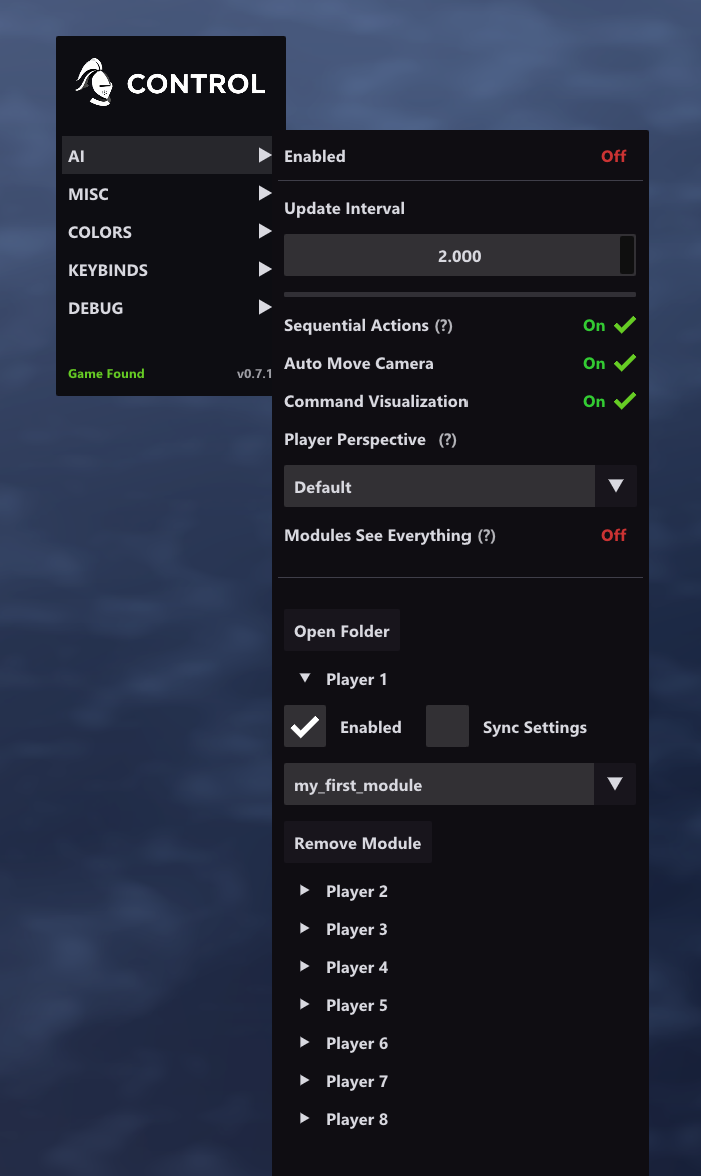
Module Discovery
CONTROL scans modules/ recursively for:
*.main.lua*.main.module
Depth limit: 3 levels below modules/.
Global AI Settings
| Setting | Default | Description |
|---|---|---|
| Enabled | On | Master toggle for all configured module instances. |
| Update Interval | 1.0 |
Seconds between Update() calls. |
| Sequential Actions | On | Allows only one successful command per update tick. |
| Tournament Mode | Off | Blocks Lua game commands outside Update(). Read-only APIs such as facts remain available. |
| Auto Move Camera | On | Auto-centers the camera on executed command targets. |
| Command Visualization | On | Draws command feedback overlays. |
| Player Perspective | Default |
Fog-of-war perspective override: Default, Player 1 to Player 8, All Players, or Gaia. |
| Modules See Everything | Off | If enabled, Lua modules ignore fog-of-war and cross-player data restrictions when reading map tiles, objects, and player state. |
The update interval is clamped to 0.1 seconds in the UI and 0.01 seconds if edited directly in settings.ini.
When Tournament Mode is off, using a game command outside Update() logs a warning once per module load. When it is on, the command is rejected.
Player Module Slots
Open a player section to configure that player's module slot. If no module is assigned yet, the section shows No modules assigned..
| Control | Description |
|---|---|
| Enabled | Turns that player's module slot on or off without clearing the selected module. |
| Sync Settings | Shares module settings through a named profile instead of player-specific settings. |
| Module | Selects the module entry point for that player. Selecting the same module again reloads it. |
| Sync Profile | Appears when Sync Settings is enabled. Multiple player slots can share the same profile. |
| Create Profile / Remove Profile | Manages reusable module settings profiles for the selected module. |
| Remove Module | Clears the selected module from that player's slot. |
Multi-Module Behavior
- The UI is grouped by player, not by a flat
Add Modulelist. - Each player section represents one module slot for that player id.
- Assigning a module to a bot player's slot suppresses that player's native decision AI while the module remains assigned.
- Module runtime warnings and Lua errors are shown directly inside the player section.
- Module-created settings panels appear per configured settings group while AI is enabled.
- Open Folder opens the modules directory.
Debug Menu
| Setting | Default | Description |
|---|---|---|
| Module Telemetry | Off | Shows sampled Update() and Render() cost for active modules in the Debug menu. |
When Module Telemetry is enabled, the Debug menu shows:
- Active modules only.
- A sampled Baseline Frame value, which represents host frame cost after subtracting sampled module time.
- Per-module
UpdandRndentries with both sampled milliseconds and relativex basevalues. - Samples spread across multiple frames each second rather than every frame.
Misc Settings
| Setting | Default | Description |
|---|---|---|
| Spectator Mode | Off | Enables the spectator-style reveal behavior that replaced the old Reveal Map option. |
| Unlock Zoom | Off | Removes the normal zoom limit. Release note: may cause rendering issues or crashes. |
| Chat Welcome Message | On | Enables CONTROL's startup chat message behavior. |
Perspective Warning
Player Perspective changes the rendered fog view. Modules See Everything changes what Lua can read. When Modules See Everything is off, map tiles, objects, and restricted player-state methods follow the assigned player's visibility and ownership limits.
Log Window
Use Log("message") from Lua to write script messages to the log window. Runtime Lua errors are also displayed and logged through the interface.